ip
Anxi User Guide
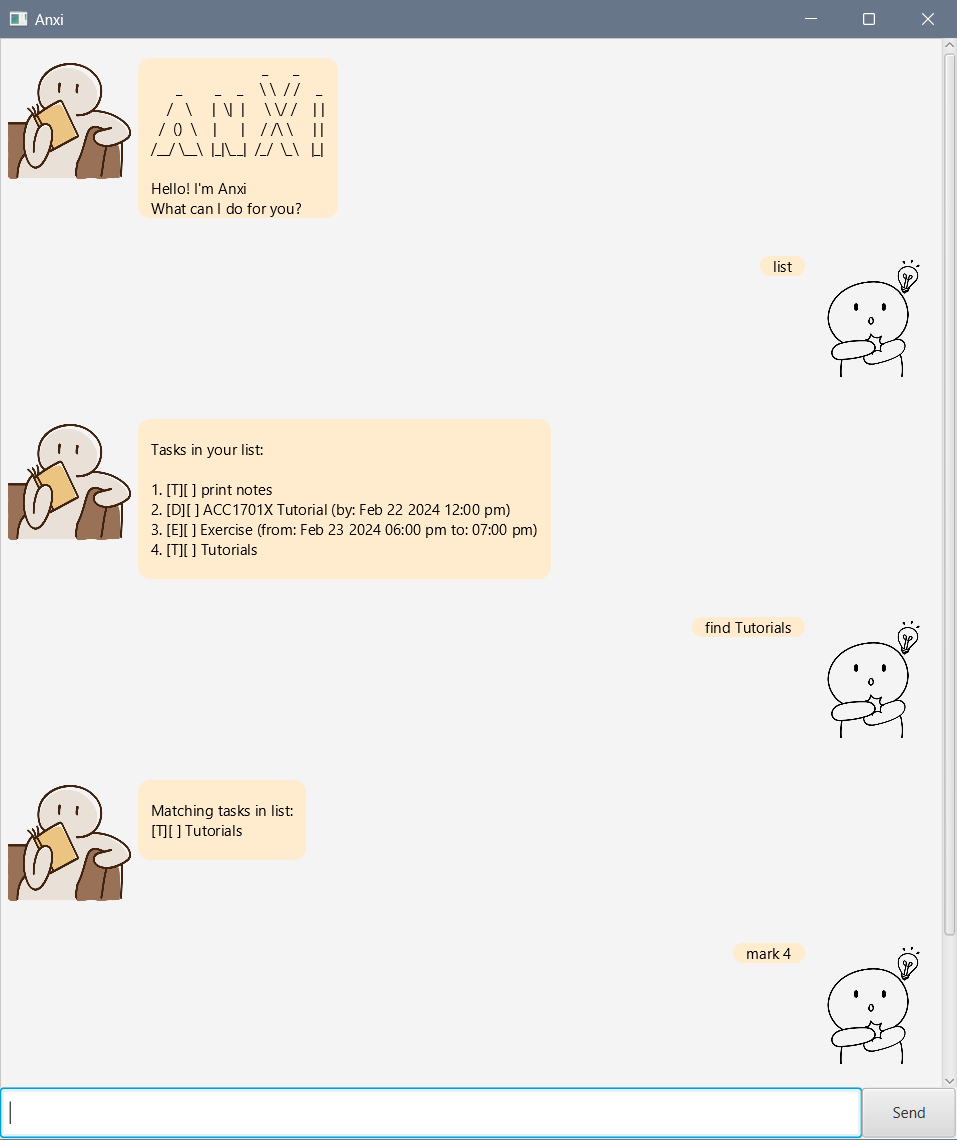
Too many things to do? Calenders not working?
Fear not! Anxi the Taskbot is here to help you manage your time!
Set up
- Install java 11
- Download Anxi.jar
Running Anxi
Launch by double-clicking Anxi.jar or call java -jar Anxi.jar from terminal.
Commands
Listing Tasks
Retrieve the list of all tasks stored in the task list.
Format: list
Example command and expected output:
list
------------------------------------------------------------------------------------------------

Tasks in your list:

1. [T][ ] Print notes
2. [D][ ] ACC1701X Tutorial (by: Feb 22 2024 12:00 pm)
3. [E][ ] Exercise (from: Feb 23 2024 06:00 pm to: 07:00 pm)
4. [T][ ] Tutorials
Adding ToDo’s
Add a new ToDo task to the task list.
Format: todo TASK
TASK: The name or a description of the todo task to be added.
Example command and expected output:
todo read book
------------------------------------------------------------------------------------------------

Boo hoo :( added new task.
 [T][ ] read book
5 task(s) in the list.
Adding Deadlines
Add a new Deadline task to the task list.
Format: deadline TASK /by DATE_TIME
TASK: The name or a description of the deadline to be added.DATE_TIME: Date and time the task is due by.
Note: Refer here for more information on date and time formats.
Example command and expected output:
deadline return book /by 2024-02-25 09:50 am
------------------------------------------------------------------------------------------------

Boo hoo :( added new task.
 [D][ ] return book (by: Feb 25 2024 09:50 am)
6 task(s) in the list.
Adding Events
Adds a new Event task to the task list.
Format: event TASK /from START_DATE_TIME /to END_TIME
TASK: The name or a description of the deadlineSTART_DATE_TIME: Date and time the event starts.END_TIME: Time the event ends.
Note: Refer here for more information on date and time formats.
Example command and expected output:
event dinner /from 2024-02-25 1800 /to 1900
------------------------------------------------------------------------------------------------

Boo hoo :( added new task.
 [E][ ] dinner (from: Feb 25 2024 06:00 pm to: 07:00 pm)
7 task(s) in the list.
Marking Tasks
Mark a task as completed.
Format: mark INDEX
INDEX: The index of the task to mark as completed.
Example command and expected output:
mark 1
------------------------------------------------------------------------------------------------

Marked as done. Good Job!
 [T][X] Print notes
Un-marking Tasks
Mark a task as uncompleted.
Format: unmark INDEX
INDEX: The index of the task to mark as uncompleted.
Example command and expected output:
unmark 1
------------------------------------------------------------------------------------------------

Such a disappointment. Unmarked the task.
 [T][ ] Print notes
Deleting Tasks
Delete a task from the task list.
Format: delete INDEX
INDEX: The index of the task to be deleted.
Example command and expected output:
delete 1
------------------------------------------------------------------------------------------------

Farewell task! Task removed from list
 [T][ ] Print notes
6 task(s) in the list.
Finding keywords
Find tasks that match keyword provided.
Format: find KEYWORD
KEYWORD: Keyword or string to look for in the task list. Case-sensitive.
Example command and expected output:
find Tutorial
------------------------------------------------------------------------------------------------

Matching tasks in list:
[D][ ] ACC1701X Tutorial (by: Feb 22 2024 12:00 pm)
[T][ ] Tutorials
Viewing Tasks on Specific Date
Format: view DATE
DATE: Date the tasks are due/ are on.
Note: Refer here for more information on date formats.
Example command and expected output:
view 25/02/2024
------------------------------------------------------------------------------------------------

Events on :
[E][ ] dinner (from: Feb 25 2024 06:00 pm to: 07:00 pm)

Deadlines on :
[D][ ] return book (by: Feb 25 2024 09:50 am)
Accepted date and time formats
Date formats:
MM-dd-yyyy, yyyy-MM-dd, MM/dd/yyyy, yyyy/MM/dd
Time formats:
HH:mm, HHmm, hh:mm a
Modifying anxi.txt
Tasks saved to hard disk are stored in anxi.txt. Modifying this file allows users to edit the task list without launching Anxi.
Formats:
- ToDo:
T | DONE | TASK - Deadline:
D | DONE | TASK | DATE_TIME - Event:
E | DONE | TASK | START_DATE_TIME | END_TIME
Inputs:
DONE: 0 if task has not been complete, 1 otherwise.TASK: Name or description of the task.DATE_TIME: Date and time task is due by.START_DATE_TIME: Date and time the event starts.END_TIME: Time the event ends.
Note: All dates must be in the format yyyy-MM-dd and all timings must be in the format HH:mm
Example:
T | 0 | Print notes
D | 0 | ACC1701X Tutorial | 2024-02-22 12:00
E | 0 | Exercise | 2024-02-23 18:00 | 19:00